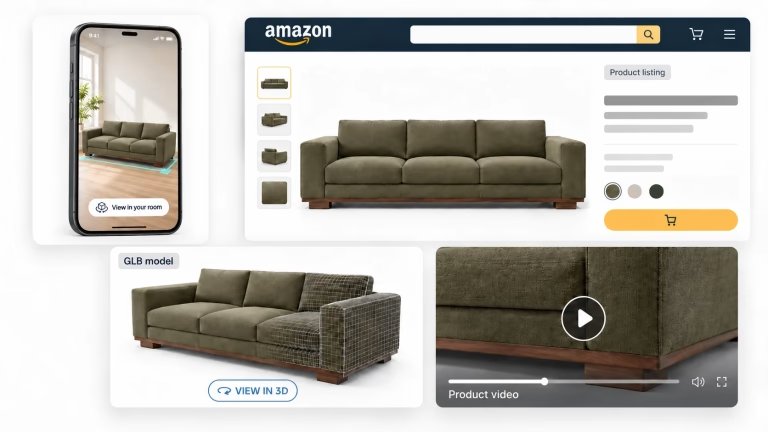
In 2026, online furniture shoppers want more than flat product photos. They want to spin a sofa around, try different fabrics on the fly, and see how a bookcase looks in their living room, all before they hit “Add to Cart.” And with more people buying online every year, e-commerce furniture businesses rely on 3D modeling for ecommerce to keep up.
That’s exactly what 3D modeling services for e-commerce deliver, at a fraction of traditional photography costs once you go past a handful of SKUs. In this guide, we’ll walk through the whole 3D landscape: why it matters, how the workflow runs in the real world, and what it’s going to cost you. Managing ten products or ten thousand? Either way, you’ll get a practical roadmap for building a business case, finding a partner who isn’t a headache, and getting your 3D assets live everywhere.
What You’ll Learn in This Guide
- Why 3D models are a must-have for e-commerce and marketing in 2026
- Key definitions include 3D modeling, rendering, interactive 3D, and AR, along with guidance on how to choose between them
- Where 3D impacts B2C results on the product detail page
- B2B benefits across the product lifecycle, including CGI photography scenarios you can create
- The ROI framework includes costs, savings, and revenue lift with pricing benchmarks
- Implementation workflow from brief to final assets
- PDP UX best practices for 3D viewers
- Performance, SEO, and accessibility for 3D assets
- Quality assurance and risk management
- Channel playbook: social, email, ads, print, and sales enablement
- Measurement, A/B testing, and analytics
- Vendor evaluation checklist, common pitfalls to avoid, and FAQ
From a single creative brief to a fully scaled catalog, it’s all here, so you can move from “why” to “how” with confidence.
1. Why 3D Modeling Matters for Furniture E-Commerce in 2026

According to Statista, furniture remains one of the largest and fastest-growing segments of US e-commerce. As average order values climb, so does the risk of buyer’s remorse. Someone spending $800 or more on a sectional sofa wants visual proof: every angle, every upholstery option, in a room that looks like their own.
So yes, furniture is one of the hardest categories to sell online. You can’t sit on a sofa through a screen, and one misleading photo can trigger an expensive return. Wrong dimensions, surprise finishes, fabric that looks nothing like the swatch: that gap between expectation and reality is the core problem professional 3D modeling solves.
The Data Behind the Shift
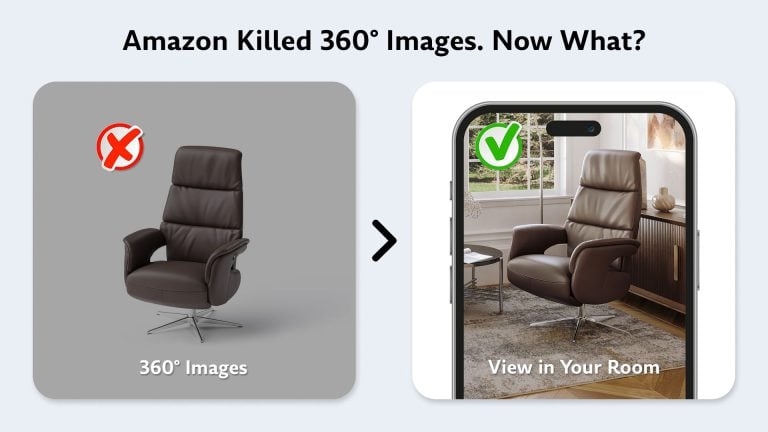
Why bother with 3D? Because it actually moves the needle. In a Shopify case study, the dog crate brand Gunner Kennels reported a 40% rise in order conversion, a 3% rise in cart conversion and a 5% lower return rate after adding 3D and AR. Amazon’s own data points the same way: a 2x improvement in purchase conversion on average when shoppers clicked View in 3D or Virtual Try-On, and 9% higher sales on average with View in Your Room enabled. In the world of high-ticket furniture, that extra engagement is usually the difference between a “maybe” and a sale.
Three Core Advantages
Faster content production. A traditional photo shoot for a 50-SKU collection means physical prototypes, a studio, a photographer, stylists and weeks of scheduling. A 3D modeling service for e-commerce can get you the same visual output from CAD files and material references. Nothing to ship, no studio downtime, no weather delays. Our 3D product modeling services work from exactly these inputs.
Consistency across channels. One master 3D model feeds everything: your PDP, marketplace listings, emails, social ads, printed catalogs and AR. Why does the sofa look the same everywhere? Because it’s literally the same digital asset.
Higher buyer confidence, fewer returns. Let shoppers check exact dimensions, zoom into fabric texture and compare finishes side by side, and there’s far less room for “it looked different online” disappointment. You’ll see that in fewer returns, fewer support tickets and stronger brand trust.
Why Photo Shoots Alone No Longer Cut It
Static photography still has its place, but it can’t keep up with a modern furniture PDP. Take configurable products, like sectionals with dozens of layouts or beds in 15 fabrics and 4 wood finishes. You’d need thousands of individual shots to cover every variant. A 3D modeling company handles that through variant mapping: change a texture, re-render, done. The geometry stays the same, only the surface changes, and you get a complete visual catalog at a fraction of the time and cost.
2. 3D Modeling vs Rendering vs Interactive 3D vs AR: Definitions & How to Choose

First, let’s sort out the terminology. People mix these terms up all the time, but they’re really different stages of the same pipeline.
3D modeling is the framing and architecture. A 3D artist is defining the dimensions and the “bones” of the product to make sure it’s a perfect replica of the real thing, accurate to within ±2 mm. Our guide to 3D product modeling covers this stage in detail.
3D rendering is the design and photography. This is where artists add the paint, the sunlight and the textures, so you end up with a finished image you can actually use in an ad.
Interactive 3D / 360-degree spin puts the model in a WebGL-based viewer (built on frameworks like Three.js or Babylon.js), so customers can rotate it, zoom in and explore it right in their browser. You’ll usually get glTF here, or its binary version, GLB, because it’s light enough for real-time web performance.
AR (Augmented Reality / WebAR) goes one step further, overlaying the 3D object in a real room through the device’s camera. On iOS, this typically uses USDZ files via ARKit; on Android, GLB files via ARCore.
Decision Shortcut: What to Choose
Mostly need high-quality imagery for PDPs, catalogs and ads? Then photorealistic furniture renders are enough, and they’re the most cost-effective place to start. Selling configurable furniture with lots of fabric and finish options? An interactive 3D viewer pays for itself by replacing hundreds of static shots. If your average order value is over $500 and returns worry you, AR (“Try in Room”) is a strong investment. Most brands start with renders, then add interactive 3D and AR as the asset library grows.
Channel Requirements at a Glance
| Channel | Format Needed | Resolution | Notes |
|---|---|---|---|
| Web PDP | JPG / WebP | 2048 × 2048 | White background + lifestyle scenes |
| Amazon | JPG | 2000 × 2000 | Strict marketplace guidelines |
| AR (iOS) | USDZ | N/A | <5 MB file size |
| Social | MP4 / GIF | 1080 × 1080 | 360° spin video, 5–10 sec |
| TIFF / PSD | 4096 × 4096 | CMYK color space |
3. Where 3D Impacts B2C Results on the Product Detail Page

The product detail page is where people decide to buy or leave. And for furniture, it’s carrying a heavy load: it has to get across scale, material feel and design quality with no physical contact. Commercial furniture 3D modeling helps with each of those gaps.
Product Pages and Marketplaces
Go PDP-first: design every visual for the product page, then reuse it elsewhere. High-resolution silo renders on white meet marketplace requirements (Amazon, Wayfair), and lifestyle roomset images help shoppers picture the item in context. You get both from the same master 3D model.
Ads and Social Media
On Instagram or Facebook, you’re not only up against other furniture brands. You’re up against friends, family and entertainment. That’s why CGI visuals like short 360-degree spin videos and animated feature callouts are built to stop the scroll. Pair them with targeted advertising and they can beat static product shots on engagement.
Emails and Catalogs
3D helps with personalized email campaigns too. Imagine a custom render of a specific configuration: “Your saved sofa in Ocean Blue linen.” That can drive more clicks and repeat purchases. And for printed catalogs, 3D rendering gets you magazine-quality shots without the magazine-sized budget.
AR and Interactive 3D Viewers
Put an interactive 3D viewer on the PDP and customers can explore by themselves. They’ll spin the product, zoom into the stitching and toggle between finishes without leaving the page. “Try in Room” AR goes further: shoppers can check that a dining table actually fits their space before they commit.
What This Means for B2B Conversion
So what do you get from all this? Three things.
- Clarity: dimensions, materials, and finish options are visible from every angle, reducing uncertainty.
- Trust: dimensional accuracy and color accuracy signal professionalism and reliability.
- Reduced returns: when expectations match reality, return rates drop, and so do the logistics costs and customer frustration that come with them.
Beyond the Hero Image
3D also gets you visuals that are hard or impossible to photograph. Want to show internal storage compartments? Use an animated exploded view. Assembly animations cut post-purchase support tickets. Feature callouts show off reclining mechanisms, pull-out beds and modular configurations. It all comes from one master model, and you can take the same assets from PDP to catalogs, ads, AR and sales decks without making them again.
4. B2B Benefits Across the Product Lifecycle

And it doesn’t stop at your website. Look behind the scenes and the benefits of 3D modeling change how furniture brands design and develop products, too.
Fewer Physical Prototypes, Faster Iteration
Think about traditional product development: every design variation needs a physical sample. With 3D, your team can check proportions, materials and finishes on screen and catch problems before anyone cuts a single piece of wood. So you’ll go through fewer prototyping rounds, move faster and save real money.
Not convinced yet? Our guide to what 3D modeling means for the furniture business breaks down the basics.
Reusable Assets Across Channels
A single master 3D model covers PDP images, email banners, social ads, printed catalogs, AR experiences and marketplace listings. Make it once, use it everywhere. You don’t pay for the same work twice, and your brand looks the same wherever people find you. Attach its materials, options and rules as data, and that master model becomes a product digital twin.
Editing a Model Instead of Rebuilding It
New collections often reuse an existing design with a few changes: a different arm shape, new legs or fittings, an added drawer, a removed shelf. On a physical prototype, every change means a new sample. On a 3D model, the artist just edits the geometry and swaps materials. So you get updated visuals without ordering a new model or building a new sample.
Faster Collection Launches
When a new collection is ready, 3D content can be produced alongside manufacturing, sometimes even before physical products exist. So your marketing assets are there on day one of a launch, not weeks later.
CGI Scenarios You Can Create
The range of visual content a single 3D model for e-commerce supports is impressive:
- Silos on white: clean product shots for PDPs and marketplace compliance
- Lifestyle scenes (roomsets): contextual imagery showing products in styled interiors
- Group shots and bundles: collections and cross-sell compositions
- Exploded views and feature callouts: technical marketing for product detail pages
Handling Configurable Products
Modular sectional sofas, beds with interchangeable headboards, cabinets with multiple door finishes: this is where the benefits of custom 3D modeling really show. With variant mapping, a single master model generates every combo of fabric, finish and leg style, and nobody rebuilds the geometry. It’s also where 3D’s cost advantage over photography gets most dramatic.
Use-Case Playbook by Category
Different furniture categories give you different 3D opportunities. Sofas and sectionals get the most from variant mapping, with dozens of fabric and layout combinations from one master model. For beds, try exploded views of mattress layers and interchangeable headboards. Cabinets are great for feature callouts: open-door shots, shelf configurations, hardware options. And outdoor furniture? Put it poolside, on a rooftop or in a garden, with no location logistics.
3D Content Governance
Got hundreds or thousands of 3D assets? You’ll need some structure. Version every model iteration, map assets to SKUs in a PIM (Product Information Management) system, keep deliverables in a DAM (Digital Asset Management) platform, and set clear approval workflows so nothing goes live without sign-off.
Omnichannel and Sales Enablement
3D assets work offline too. In-store kiosks let customers browse the entire catalog, even goods that aren’t on the showroom floor. And sales decks help B2B reps show configurable options to hospitality buyers, interior designers and contract clients.
5. ROI Framework: Costs, Savings & Revenue Lift

Let’s talk numbers. Everyone asks the same thing about product 3D modeling e-commerce prices: does it actually save money? It does, and the savings compound as your catalog grows.
Cost Savings: Photography vs. 3D for 100 SKUs
| Cost Item | Traditional Photography | 3D Modeling |
|---|---|---|
| Studio / setup | $3,000–$5,000 | – (no studio needed) |
| Photographers / artists | $9,000–$13,000 (20 days) | $8,000–$20,000 (master modeling) |
| Props & styling | $5,000–$10,000 | – (digital scenes) |
| Retouching | $7,000–$11,000 | Included |
| Reshoots (10% error rate) | $6,000–$11,000 | $0 (revisions included) |
| TOTAL | $30,000–$50,000 | $8,000–$20,000 |
| Savings | – | $22,000–$30,000 (60–73%) |
Scaling Economics
Here’s the nice part: the savings percentage holds as your catalog grows, and it often improves. Why? Fixed costs like scene templates and material libraries get spread across more SKUs.
| Catalog Size | Photography Cost | 3D Modeling Cost | Savings | Time Saved |
|---|---|---|---|---|
| 10 SKUs | $3,000–$5,000 | $800–$1,500 | 60–73% | 6 weeks |
| 50 SKUs | $15,000–$25,000 | $4,000–$10,000 | 60–73% | 8 weeks |
| 100 SKUs | $30,000–$50,000 | $8,000–$20,000 | 60–73% | 10 weeks |
| 500 SKUs | $150,000–$250,000 | $40,000–$100,000 | 60–73% | 12+ weeks |
Hidden Benefits That Compound ROI
More variants = better conversion. When you can afford to show every color and material option, shoppers find exactly what they want and buy it. Brands that expand their visual variant coverage typically see conversion rate lifts of 15–40%.
Fewer returns. Accurate 3D visuals set the right expectations. Return rate reductions of 8–12% are common when customers can check dimensions, materials and finishes before they buy.
Asset repurposing. One 3D model feeds PDP, email campaigns, social ads, print catalogs and AR, so each asset earns more with no extra production cost.
Cost Drivers to Watch
Why does one model cost more than another? Mostly complexity. A tufted Chesterfield sofa takes more work than a basic bench. Then there’s how many materials and fabric swatches you need, how many render angles you want, whether there’s animation, and whether you’re adding interactive configurators or AR assets. Know all that going in and you’ll set a realistic budget, with less scope creep.
Break-Even Template
As a rule of thumb, most furniture brands break even on 3D at around 15–25 SKUs, compared with equivalent photography costs. After that, every extra SKU widens the savings gap. Got a big configurable catalog? Then the ROI argument gets very hard to ignore.
6. Implementation Workflow: From Brief to Final Assets

Want to plan timelines, prepare inputs and set realistic expectations with your 3D modeling service for e-commerce? Here’s how the production pipeline usually goes.
Step 1: Input & Specifications (Day 1–2)
Everything begins with a creative brief, and the more you put in it, the easier your life gets later. We’re talking CAD files or technical drawings, exact measurements, your brand guidelines, physical material samples or high-res fabric scans, and reference photos of the real product. Send a full package and you’ll sit through fewer revision rounds.
No CAD files? You can still start. All you need at minimum is a set of clear product photos from several angles. Overall dimensions, simple 2D drawings and texture references fill in the rest, and each one means less guessing for the artist and fewer corrections for you. If the product only exists as photos, see how we create a 3D model from photos.
Step 2: 3D Modeling & Materials (Day 3–7)
This is where your product takes shape, down to ±2 mm dimensional accuracy. Our artists also create or calibrate PBR (Physically Based Rendering) textures from the references you sent, and set up a material library for later. Yes, it’s the slowest stage. The good news? Once the master model exists, variants go fast.
Step 3: Client Review (Day 8–9)
Now it’s your turn. You’ll look at test renders from 3–5 angles and tell us what’s off. Most SLAs (service level agreements) give you 2 revision rounds at this point, so don’t rush it. Proportions, materials, color: if something bugs you, say it now, before full production kicks off.
Step 4: Render Production (Day 10–11)
Happy with the test renders? Then the team batch-renders every variant and format you asked for. That could mean JPG, PNG and TIFF for imagery, GLB (glTF) and USDZ for interactive 3D and AR, plus MP4 if there’s animation.
Step 5: Asset Delivery & Storage (Day 12)
Everything lands in your DAM or cloud storage, sorted by SKU. And yes, you get the editable source files too (.blend, .max, .fbx), so nobody’s stuck when a new variant comes up next year.
Timeline Summary
- New SKU (from scratch): 10–12 business days.
- Variant from existing master model (new color, material, or finish): 1–2 business days.
What happens next? Assets move from your Digital Asset Management (DAM) and Product Information Management (PIM) systems to the Product Detail Page (PDP), and from there to every other channel you run.
Scaling Production
Got a big catalog to roll out? That’s when batch production earns its keep. Reusable scene templates for room sets and lighting mean you aren’t setting up from zero for each SKU. And once volume really grows, you’ll be glad you kept a tidy asset library, with clear versions, SKU names and approvals, because that’s what stops things from slipping through.
7. PDP UX Best Practices for 3D Viewers

Putting a 3D viewer on your product detail page isn’t only a tech job. You’re designing an experience, one that should build confidence and help people buy.
Mobile-First Design
Most furniture browsing happens on phones, so picture your customer on a bus with one thumb free. Can they hit the controls easily? Does the viewer fight with normal scrolling? Do they see a skeleton screen or progress bar while the model loads, or just nothing? And what about browsers without WebGL? Keep a fallback image ready, so nobody’s staring at a blank space.
Viewer Placement and Labeling
Where does the viewer go? Right in the main product image gallery, where people will actually find it. Nobody’s hunting for it below the fold. Give it a plain label too, since “View in 3D” or “360° View” tells shoppers far more than a mystery icon does. Same goes for “Try in Room” AR: keep that button close to the main CTA and call it what it is.
When to Use Animation vs. Static Renders
Here’s a simple way to decide. If you’re showing what a product does, like a reclining mechanism, pull-out storage or assembly, go with animation. If you’re showing how it looks, a static render does the job. Most PDPs can use both, because shoppers want the emotional pull and the practical info.
Quality Factors That Impact Conversion
| Quality Factor | Poor 3D | Professional 3D | Impact on Conversion |
|---|---|---|---|
| Material accuracy | Generic textures | Scanned/calibrated (color management) | +15–25% |
| Proportions | Eyeballed | CAD-precise (±2 mm) | +10–18% |
| Lighting | Flat/generic | Studio-matched | +12–20% |
| File formats | JPG only | Multi-format (JPG, GLB, USDZ) | +8–15% |
| Background quality | Pure white only | Lifestyle + white | +20–30% |
Trust and Compliance
Ever had a customer say the color looked different online? A short disclaimer helps: “Colors may vary slightly depending on your screen settings.” It won’t fix everything, but it sets expectations. For expensive pieces, let people order swatches and see the material in person first.
Accessibility Considerations
Don’t forget people who can’t use a mouse or see the screen well. Your 3D viewer should meet basic WCAG guidelines: text alternatives, keyboard navigation and enough contrast in the controls. It’s the right thing to do, and more people can shop with you.
Internationalization
Selling in more than one country? Then people will want inches and centimeters, and material names they recognize. It’s a small thing, but international buyers notice.
Choosing a Viewer
You’ve got two roads here: a self-hosted embed with open-source tools like model-viewer or Three.js, or a third-party SaaS platform. Which one’s right for you? That comes down to loading speed, how it behaves on mobile, whether it plugs into your analytics, and what it does on browsers it can’t support.
8. Performance, SEO & Accessibility for 3D Assets

A stunning 3D viewer means nothing if it tanks your page speed. You need it fast for your users and for your search rankings.
Technical Budgets
Some numbers to keep on your wall. GLB (glTF) files for web viewers and USDZ files for AR on iOS should both stay under 5 MB. Web images need at least 2048 × 2048, at under 500 KB for JPG/WebP. Print is a different story: you’re looking at 4096 × 4096 in CMYK.
Optimization Techniques
Where do you start if a model’s too heavy? Compression. Draco for geometry and KTX2 for textures can shrink GLB files with no visible quality loss. After that, look at polygon count: LOD (Level of Detail) systems send lighter models to phones and heavier ones to desktops. There’s also no reason to load the viewer before anyone wants it. With lazy loading, it waits until someone scrolls there or taps it, which protects your Largest Contentful Paint (LCP) score. Until then, shoppers just see a static JPG/WebP render.
Core Web Vitals
Google’s Core Web Vitals affect search rankings, and a 3D viewer can hurt all three if you’re not careful. You want LCP (Largest Contentful Paint) under 2.5 seconds. For CLS (Cumulative Layout Shift), save space for the viewer, or it’ll shove your content around as it loads. And INP (Interaction to Next Paint)? Viewer controls should answer within 200 ms.
SEO for 3D Media
Search engines can’t look at your 3D viewer the way a shopper does, so help them out. Mark up 3D media with structured data (schema markup) and write real alt text for fallback images. And if a 3D-heavy page gets slow, your organic rankings will pay for it.
Accessibility for Interactive 3D
What does WCAG compliance look like for a 3D viewer? A text description of the product for screen readers, controls that work from a keyboard, and a static image as an alternative. It’s worth tracking whether people use these, so you know what to improve.
Measurement After Launch
Launched? Good, now keep an eye on load times, engagement and errors across devices and browsers. If people keep leaving 3D pages on one mobile browser, something’s wrong there, and your fallback strategy is the first place to look.
9. Quality Assurance & Risk Management

What separates 3D that converts from 3D that damages trust? Accuracy. A poorly modeled product is worse than no 3D at all, because it sets false expectations and makes the return problem worse.
Material Realism
Stock textures give themselves away fast, especially on fabric, leather and wood grain, where the small variations are what make a material look real. That’s why professional 3D uses a PBR (Physically Based Rendering) workflow, with textures calibrated from your physical swatches, finishes and samples.
Dimensional Accuracy
How close is close enough? The industry standard is ±2 mm tolerance to CAD requirements. That keeps dimensions, joint alignment and overall scale true to the physical product. And if your PDP lists exact dimensions, you really can’t get by with less.
Color Accuracy and Color Management
Your customer’s screen and yours won’t show the same color. We can’t change that, but a solid color management system helps: sRGB for web, CMYK for print, and Pantone matching where it applies. For big purchases, physical swatches are still your best friend, and that disclaimer on the PDP doesn’t hurt either.
Consistent Lighting and Brand Alignment
Imagine scrolling a catalog where every sofa is lit differently. It feels cheap, right? Furniture brands depend on a premium feel, so lighting setups and shadow behavior should match from one render to the next.
QA Checklist per SKU
Think of this as your last look before launch. Do the dimensions match the specs? Do materials and textures match the physical samples? Is color the same across all output formats? Do lighting and shadows fit your brand standards? Are file formats and resolutions right for each channel? And are the metadata and SKU tags in place for your DAM?
Approval Workflow and Sign-Off
Who approves what, and when? Write that into your SLA. Usually there are two gates: one at the test render stage for geometry and materials, and one at final production for the full variant set. Whatever you do, don’t skip test renders. It’s one of the most common and most expensive mistakes brands make.
Security and IP Protection
Nobody likes reading contracts, but this part’s worth it. Who owns the model? Can you reuse it and create derivatives? Do you get the source files? Get those answers in writing. And if competitor scraping worries you, ask how your models are served on the web and whether someone could pull them off your site.
10. Channel Playbook: Social, Email, Ads, Print & Sales Enablement

Here’s one of the strongest arguments for 3D modeling for e-commerce: a single master model can power every marketing channel. So how do you get the most out of it?
Product Detail Pages and Marketplaces
Your PDP comes first. Put a silo render on white as the main image (Amazon and Wayfair require it), add lifestyle room sets as supporting images, and let an interactive 3D viewer or 360-degree spin hold people’s attention. Each marketplace has its own format rules, so check the Channel Requirements table in Section 2 and get compliant assets right from the start.
Social Media
Short 360° spin videos (5–10 seconds, 1080 × 1080 MP4) tend to beat static images on Instagram and Facebook. Feature callout animations are great for Stories and Reels. You’re trying to stop the scroll, after all, and a phone photo of a showroom floor isn’t going to do that.
Email Campaigns
Someone saved a sofa in a certain fabric? Show them that exact configuration in your next email. Personalized renders like this can drive more clicks and conversions. Just keep the files light, using JPG/WebP images that load fast.
Printed Catalogs and Brochures
3D product visualization gets you magazine-worthy shots at a fraction of traditional photography costs. For print, export at 4096 × 4096 in CMYK. Using the same scene templates as your digital assets means the catalog and the website look like they belong together.
Sales Enablement and B2B
Your showroom can’t hold everything, but a kiosk can. Shoppers can browse the full catalog in-store, including items that aren’t on the floor. Sales teams get something useful too: 3D-rendered decks for showing configurable options to hospitality buyers, contract clients and interior designers.
Scaling Across the Catalog
How do you stay efficient at scale? Batch similar products together. Keep one master model per base product and get variants from material and finish swaps. Reuse scene templates for lifestyle imagery. And put everything in a DAM with clear SKU names and version control, unless you enjoy hunting for files.
Omnichannel Brand Consistency
Amazon, Instagram, a printed catalog, an in-store kiosk: your product looks the same in all of them, because they all draw from the same 3D source files. People start to recognize you and trust you, and that’s what brings them back.
11. Measurement, A/B Testing & Analytics

You’re paying for 3D, so you’ll want to know what it’s doing for you. A clear analytics plan shows the impact and tells you what to improve.
A/B Testing Plan
Want real proof? Run controlled tests of 3D-enabled PDPs against static-image-only versions, and change one thing at a time. Does a viewer beat no viewer? Is the gallery better than below the fold? Which label wins, “View in 3D” or “360° View”? Does AR change conversion? And be patient: wait for statistical significance before you decide anything.
Analytics Instrumentation
Your analytics should tell you what people do inside the viewer. Are they rotating the model? Tapping “Try in Room”? Zooming in? Switching fabric, color or finish? See how long they stay, then follow the path from 3D interaction to add-to-cart. That’s the story you’re after.
Key Metrics to Monitor
- Add-to-cart (ATC) rate: compare before and after 3D implementation.
- Conversion rate lift: brands typically see +15–40% with comprehensive 3D visuals.
- Return rate reduction: expect −8–12% with dimensionally and materially accurate models.
- Engagement metrics include time on page, interaction rate with 3D viewer, and changes in bounce rate.
Building the Before/After Benchmark
Before 3D goes live, write down your PDP numbers. You’ll need them. After rollout, measure the same things over the same length of time, and don’t forget seasonality or traffic source changes, because they can fool you. If you’ve got a clean before/after comparison, proving ROI to your team gets much easier, and so does asking for more budget.
12. Vendor Evaluation Checklist and Common Pitfalls

Even the best 3D rendering services can’t save a project that starts with the wrong assumptions. Here are the mistakes we see most often, and you can avoid every one with a bit of planning.
Common Pitfalls to Avoid
Over-generic scenes. Stock-looking furniture imagery kills brand identity. You want custom scenes that fit your brand’s look and your target market, so ask for them.
Material mismatch. What if renders don’t match the real fabrics and finishes? Then returns go up, not down. Ask for calibrated color management and send physical samples for reference.
Scope creep in variants. Set variant limits in the creative brief. Otherwise a “simple” project can balloon the moment someone asks for “just one more” finish.
Skipping test renders. This is your QA checkpoint. Save a day here and you could lose weeks on rework later.
Not requesting source files. No editable source files? Then you’re stuck with the same vendor for every future update, variant or repurpose. Make sure you own the .blend, .max or .fbx files.
Vendor Evaluation Checklist
Pre-Project Questions
- Do you provide test renders before full production?
- What is your revision policy? (2 rounds standard per SLA)
- Can we see samples of your material accuracy and color accuracy?
- What is your turnaround for urgent projects?
Deliverables to Request
- Multiple formats: JPG, PNG, TIFF, WebP
- AR-ready files: GLB/glTF (Android), USDZ (Apple)
- Layered files: PSD with separate shadow/background layers
- Source files: .blend, .max, .fbx for future edits and variant mapping
- Multiple resolutions: 1024px, 2048px, 4096px
- 360-degree spin videos (5–10 sec MP4)
Quality Specifications
- Resolution: min 2048 × 2048 for web, 4096 × 4096 for print
- Color space: sRGB for web, CMYK for print
- File size: <500 KB for web JPG, <5 MB for GLB
- Dimensional accuracy: ±2 mm tolerance
- Material calibration: from physical samples or Pantone
Licensing & Ownership
- Full commercial rights to all renders
- Ownership of source 3D files
- Rights to create derivatives and variants
- No watermarks or attribution required
- IP protection: competitor scraping risk addressed
Project Management
- Dedicated project manager
- DAM/cloud storage for asset delivery
- Organized file naming convention (by SKU)
- Version control system
- Post-delivery support period (30–90 days)
Ready to See What 3D Can Do for Your Brand?
Explore types and features of 3D modeling service to enhance your visual marketing like never before.
Explore 3D modeling servicesProfessional 3D modeling for e-commerce isn’t a nice-to-have anymore. Leading furniture brands build their visual strategy around it. Faster launches, lower return rates, one asset pipeline for every channel: the ROI case is clear.
Looking for a 3D modeling service for ecommerce to try first-hand? Contact CGIFurniture for professional 3D modeling and get production-ready assets, from a single SKU to a full catalog.
How do 3D models improve e-commerce conversion rates and reduce return rates?
Shoppers can inspect products from every angle, zoom into material details and, with AR, place items in their space. That takes away uncertainty at purchase, lifting conversion rates by 15–40% and cutting return rates by 8–12%, depending on the product category and the quality of your 3D.
Is CGI better than product photography for furniture and appliances?
If you’ve got more than a handful of SKUs or configurable products, CGI is usually cheaper, faster and more versatile. It won’t replace everything, and some brands still photograph hero shots for editorial use. But for scalable PDP and marketing imagery, 3D modeling gives you more output per dollar.
How long does it take to create a marketing-ready 3D model?
A new product model typically takes 10–12 business days from brief to final assets. Variants (new colors, materials, or finishes from an existing master model) take 1–2 business days.
What deliverables should we request for marketing and e-commerce?
At minimum: high-resolution JPG/PNG/WebP images for PDP and web, TIFF for print, GLB and USDZ for interactive 3D and AR, source files for future edits, and 360-degree spin videos for social. See the full checklist above for specifications.
How do we scale from one SKU to a whole catalog?
Start with a master model for each base product. Generate variants through material and finish swaps (1–2 days per variant). Use batch production, reusable scene templates, and a DAM organized by SKU to manage the growing asset library efficiently.